This post may contain affiliate links. Mommies with Cents receives free products for review purposes and may sometimes be compensated for posts but all opinions expressed are 100% my own. See Mommies With Cents disclosure policy for more details.
I can hardly wait for “Throw Back Thursday” and “Flashback Friday” this week! After years of stressing about having my photos stored on old computers and random external hard drives I finally have them all in one place and easily accessible from any computer as well as my phone. Everalbum is must-have for busy moms! It backs up your photos automatically from your phone and your computer and stores them in the cloud so you never have to worry about losing family photos again. This is a HUGE relief for me since before I found Everalbum, my photos were all over the place. My first born’s pictures from the first two years of his life were on an old Dell laptop that only works when plugged into the wall with it’s charger that has seen better days. The computer was on it’s last leg and I worried my photos would be lost forever. My second born’s photos from her first two years were all on my old Macbook with a similar battery/charger issue. Recently I almost lost all of my third child’s first photos when my current Macbook which is only about a year old crashed for no reason. Luckily a nice employee at the Genius Bar at the Apple Store was able to recover them for me but told me not everyone is so lucky. He recommended that I back up my photos on a regular basis.
That’s when I started using an external hard drive to back up my files but, admittedly, I wasn’t very diligent about it. The last time I backed up my computer was 105 days ago. I know because my computer reminds me every single night and yet I still let it slide. I was in desperate need of something more user friendly. I found it in Everalbum.
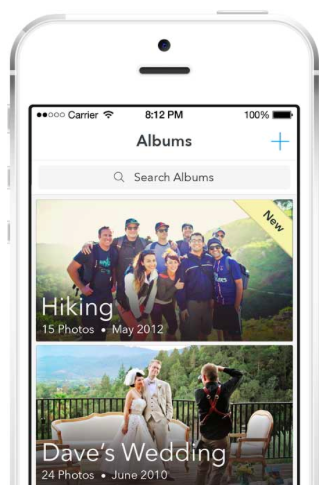
Everalbum is unbelievably easy to use. In fact, when I describe it to people, I tell them “it’s like magic!” Today for example, I took a few photos of my kids with my phone when we were out playing in the yard. Later when I came in to do some work on my laptop, the pictures I took were already in my Everalbum. I didn’t have to plug in my phone or upload them via Dropbox. This feature alone saves me so much time! Another reason this feature is so awesome is because I can delete my camera roll to free up space on my phone anytime I want to. My photos are still accessible via the Everalbum app but they don’t take up any storage space.
Using Everalbum is as easy as downloading and installing the program on your phone and computer. It only took a matter of minutes for Everalbum to access all of my photos stored on my current computer and phone. I was also able to import photos off my external hard drive with just a few clicks. It’s amazingly user-friendly.
In Everalbum, you can easily find your photos. View the timeline to see all of your pictures in chronological order or view by album. Everalbum automatically sorts your pictures into albums for you! You can change the cover photo and add a title if you want to otherwise it uses the date and a random photo from the album. It would have taken ages to organize the photos myself so I was pretty excited to see everything already in order.
I know privacy is a big concern for a lot of people, and understandably so! Privacy is very important to Everalbum and they’ve done everything possible to guarantee that all of your photos are private to you and only you by default, except when you want to share your photos privately with family and friends.
There are so many awesome features of Everalbum — this is just the tip of the iceberg! I’ll be telling you more about Everalbum in the coming weeks but I encourage you to check it out for yourself! It’s very affordably priced:
- Just $7.99/month or save 20% by buying yearly at $79/year and have up to 50,000 photos backed up in full resolution
- Never worry about GBs, or MBs storage, Everalbum doesn’t care about that!
Sign up for Everalbum Premium today and experience the huge sense of relief that I did, knowing that your photos are safe and organized! You won’t regret it!
great review of this. i am interested, but i have nearly 55,000 photos right now that i’d like to have access to… 🙂
You’d be right on the edge of Premium before having to go up to the Pro package which isn’t available yet but will be $29.99/mo — totally worth it!
Jeani – I’d be happy to extend some photo space for you with the $7.99 package. I ‘d be happy to give you those extra 5,000 for free. Email me at [email protected] and we can get it setup!
Andrew