This post may contain affiliate links. Mommies with Cents receives free products for review purposes and may sometimes be compensated for posts but all opinions expressed are 100% my own. See Mommies With Cents disclosure policy for more details.
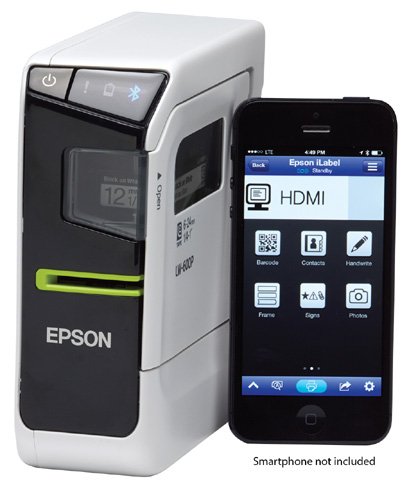
Are you an organization junkie? Do you like to have everything in it’s place with a pretty little label? I wish I were more organized and while I love the idea of having every little thing tucked neatly away, it’s just not realistic for me in this season of life with three littles at home. Still, there’s always room for some improvement and Epson has made the task of labeling an easy one with today’s technology. Guess what? There’s an app for that!
THe Epson LabelWorks Portable Label Printer uses bluetooth connectivity from your iOS or Android smartphone or tablet to print labels on-the-go. This versatile device allows you to print adhesive labels, ribbon labels, iron-on labels and more in a variety of different sizes. The built in automatic cutter, compact size and compatibility with multiple apps round out the features of the LabelWorks Portable Label Printer. It is battery operated for portability but also comes with an AC adapter. The small but might printer can also print from Windows and Mac systems via a USB cable.
You can use the label maker for more traditional things like labeling pantry items or making iron-on labels for your children’s clothing. Or you can use the label maker for more high tech things like adding video to your scrapbook pages. Using the stkr.it app with the EpsonLabelWorks option you can create one of a kind QR codes that you can print and add to your scrapbook pages. Link to code to a photo, video or audio clip so that it can be seen or heard from a mobile device when the code is scanned. I haven’t tried this feature yet but it really makes me want to get back to scrapbooking. Things have come a LONG way in the 7 years since I made my last scrapbook and the technology available today can add so much to your photo books!
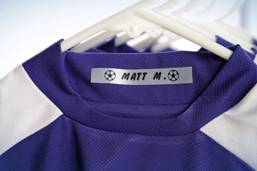 Right now though, I’m in “getting by” mode and terribly busy. I just want to make sure my children’s belongings make it home at the end of the day. That’s why I love the iron-on labels which can be easily added to clothing, backpacks or any other fabric. They are durable and machine-washable, and a great way to identify your children’s stuff.
Check out some of the great features of the LabelWorksLW600P:
- “True View” label preview uses the camera function to ensure that labels exactly match what’s on the screen
- Create, edit and print wirelessly
- Use the touchscreen interface to create “handwritten” labels
- Speech to Text voice transcription and printing
- In-app storage of created labels for future use
- Import custom graphics such as symbols, logos, and photographs to copy and paste onto labels for a more professional or personalized look
- Create QR code labels for content sharing or barcode labels for inventory management which can be scanned by third party apps.
The LabelWorks print is compact and lightweight. It comes with over 100 label design templates and 400 symbols. In addition to the iron-on labels, the printer is also compatible with a variety of other tapes including glow-in-the-dark, metallic reflective, and ribbon which is really fun for wrapping gifts with a personal touch. Just image all you can do with this small but mighty device!
You can find out more about this product at www.Epson.com.
Feeling lucky? Enter to win an Epson LabelWorks printer by filling out the form below.
A complimentary product/service was provided for this review, however, all opinions expressed are my own. I was not compensated in any other way. See Mommies With Cents disclosure policy for more details.
Also, be sure to check out all of our other giveaways. NOTE: If you don’t leave your address, I won’t have a way to get your prize to you. If you need more guidance filling out this form, you can watch this video on how to enter Rafflecopter giveaways.
This giveaway is open until October 15, 2013 at 12:01 am EST to U.S residents.
Your information is confidential and used for contacting the winner and prize fulfillment purposes only.