This post is sponsored by PicturesOnGold.com.
Ever since I was a little girl, I’ve always searched for the perfect Mother’s Day gifts to show my mom that she’s loved and appreciated. Admittedly, I haven’t always succeeded. There have been some flops along the way but this year I think I hit the nail on the head with a custom laser engraved locket from PicturesOnGold.

There are a LOT of options when it comes to Mothers Jewelry – Gifts For Mom. To me though, lockets have always seemed extra special. I could never figure out how to get the perfect tiny photos for them so have always gone a different route… until this year. PicturesOnGold.com makes it really easy to create a quality custom locket. Design Your Own Locket following these simple steps:
1. Customize the FRONT SIDE of the Locket by selecting CLIP ART. There are many to choose from!
2. Proceed to the next step to add a PHOTO to the left side. Choose to upload the file. You can center it yourself.
3. Proceed to the next step to add a PHOTO to the right side. Choose to upload the file then center it how you like.
4. Click on the next step to add a PERSONAL MESSAGE on the reverse side.
5. Click on next step and choose the chain you’d like.
6. Click on next step to PREVIEW the finished locket before you add it to the cart.
7. If you would like to make changes you can do so now.
I love the design of the clip art I chose for my mom’s locket shown in the photo above. I chose Sterling Silver but gold is also available.
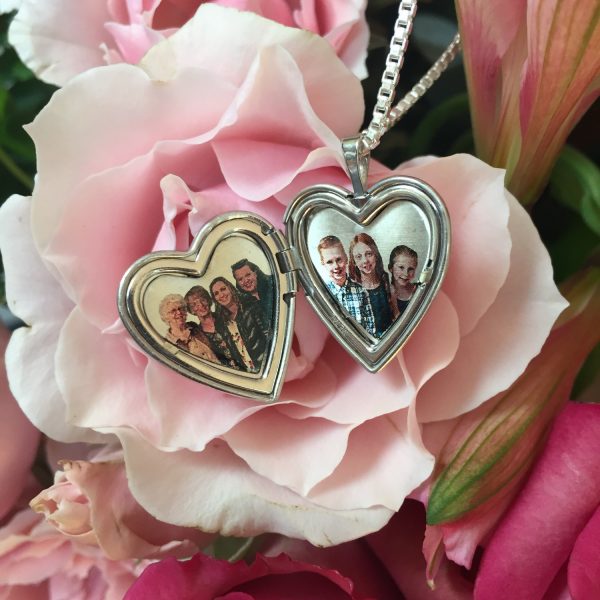
I am thrilled with how this locket turned out. The photos are laser engraved making them 100% waterproof and scratch proof. They are guaranteed to last a lifetime! The process automatically removes your photo’s background but you can choose to leave it in if you’d like — just leave a note in the Special Instructions box. If your photo has people in it that are spaced apart, PicturesOnGold digital artists will enhance the photo to bring them closer together. If your photo doesn’t fit perfectly inside the locket and you see white space, don’t be concerned, it will automatically be filled in.
On the left I selected a photo from a recent Mother/Daughter lunch that included my sister, my mom, my grandma and myself. This is a rare occasion and I think my mom will love the photo. On the right side of the locket I choose a photo of my children. My mom loves her grandchildren so she’ll love keeping them so close to her heart!
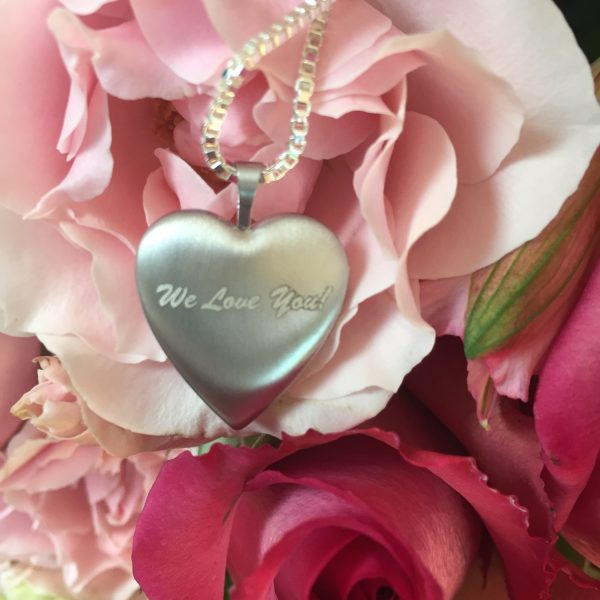
You can choose to have a special message engraved on the back. I kept it simple with “We Love You!” The box chain I selected is a really nice quality and it will hold up well, keeping the locket secure. 
Your completed locket will typically ship within one day — it’s so fast! It also comes in a really nice box, ready for gifting. I even have a special code for you! Use code MOM10 for 10% off your order. It literally takes just minutes to design and order your locket on desktop or mobile.
I made a quick video so you can see my locket and learn about the design process. Watch it below:
Complimentary product was provided for this review, however, all opinions expressed are my own. I was also compensated for my time. See Mommies With Cents disclosure policy for more details.
Feeling lucky? Enter to win a PicturesOnGold Locket by filling out the form below. Also, be sure to check out all of our other giveaways. NOTE: If you don’t leave your address, I won’t have a way to get your prize to you. If you need more guidance filling out this form, you can watch this video on how to enter Rafflecopter giveaways.
This giveaway is open until May 13, 2018 at 12:01 am EST to U.S residents.